Using HooCode
This page collects day-to-day usage details that do not fit on the quickstart page.
Interactive Mode
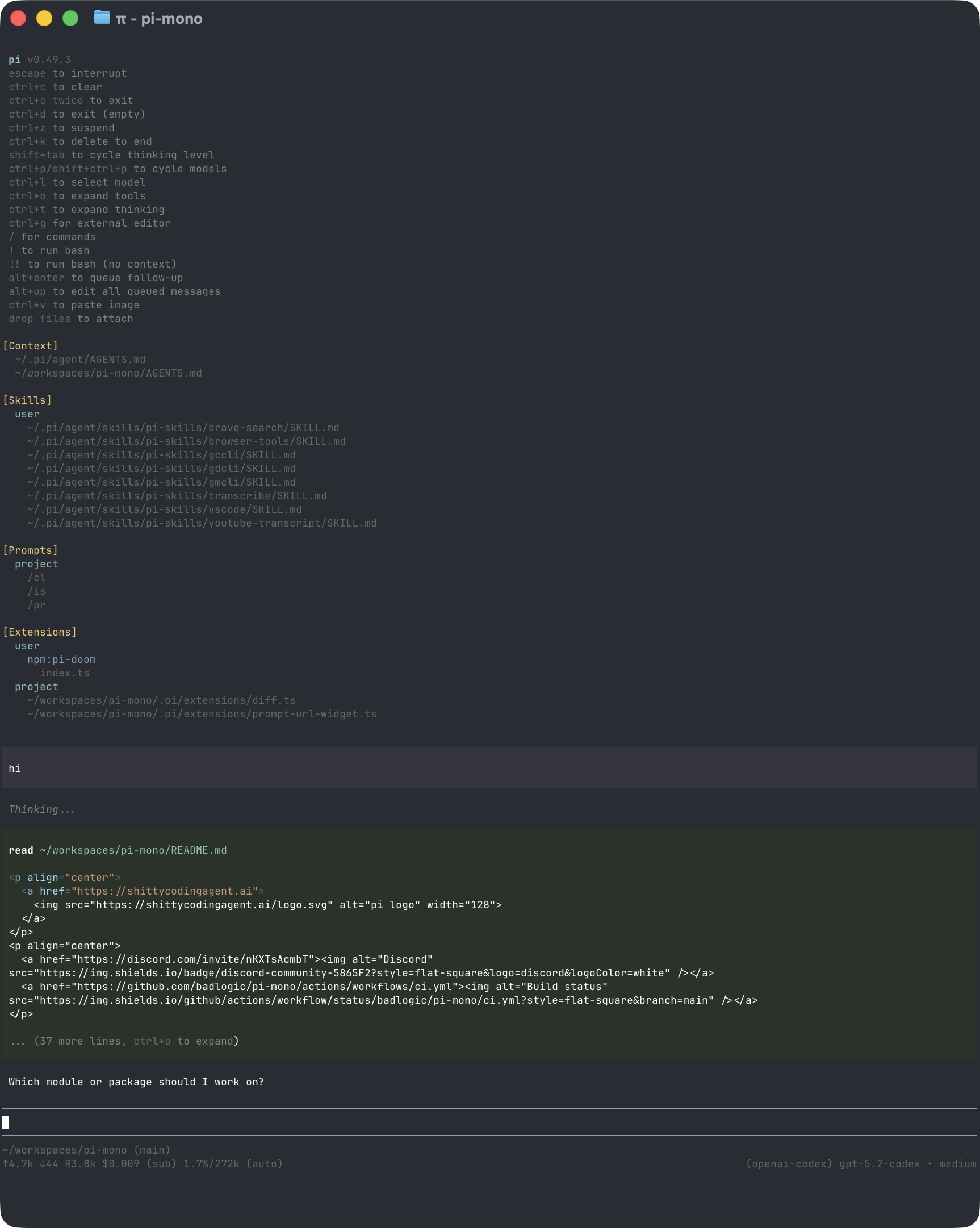
The interface has four main areas:
- Startup header - shortcuts, loaded context files, prompt templates, skills, and extensions
- Messages - user messages, assistant responses, tool calls, tool results, notifications, errors, and extension UI
- Editor - where you type; border color indicates the current thinking level
- Footer - working directory, session name, token/cache usage, cost, context usage, and current model
The editor can be replaced temporarily by built-in UI such as /settings or by custom extension UI.
Editor Features
| Feature | How |
|---|---|
| File reference | Type @ to fuzzy-search project files |
| Path completion | Press Tab to complete paths |
| Multi-line input | Shift+Enter, or Ctrl+Enter on Windows Terminal |
| Images | Paste with Ctrl+V, Alt+V on Windows, or drag into the terminal |
| Shell command | !command runs and sends output to the model |
| Hidden shell command | !!command runs without sending output to the model |
| External editor | Ctrl+G opens $VISUAL or $EDITOR |
See Keybindings for all shortcuts and customization.
Slash Commands
Type / in the editor to open command completion. Extensions can register custom commands, skills are available as /skill:name, and prompt templates expand via /templatename.
| Command | Description |
|---|---|
/login, /logout |
Manage OAuth or API-key credentials |
/model |
Switch models |
/scoped-models |
Enable/disable models for Ctrl+P cycling |
/settings |
Thinking level, theme, message delivery, transport |
/resume |
Pick from previous sessions |
/new |
Start a new session |
/name <name> |
Set session display name |
/session |
Show session file, ID, messages, tokens, and cost |
/tree |
Jump to any point in the session and continue from there |
/fork |
Create a new session from a previous user message |
/clone |
Duplicate the current active branch into a new session |
/compact [prompt] |
Manually compact context, optionally with custom instructions |
/learn [all|stats|settings] |
Mine recent sessions for repeated directives, fixes, and workflows and promote them to AGENTS.md or a skill; stats reports what became of past proposals, settings shows where sessions are read from and the thresholds in force |
/copy |
Copy last assistant message to clipboard |
/export [file] |
Export session to HTML |
/share |
Upload as private GitHub gist with shareable HTML link |
/reload |
Reload keybindings, extensions, skills, prompts, and context files |
/hotkeys |
Show all keyboard shortcuts |
/changelog |
Display version history |
/import <file> |
Import and resume a session from a JSONL file |
/cost |
Session token and cost totals, broken down by model |
/quit |
Quit hoocode |
Modes and planning
See Modes for what each mode changes.
| Command | Description |
|---|---|
/mode <ask|plan|build|debug> |
Switch the active mode |
/plan |
Shorthand for /mode plan |
/approve |
Approve the current plan and switch to build mode to execute it |
/grill [me|plan] |
Stress-test the current plan before committing to it |
/goal [--max-turns N] <objective> |
Work autonomously toward a goal |
Plugins and extensibility
See Plugins for the marketplace and trust model.
| Command | Description |
|---|---|
/plugin marketplace add <git-url|path> |
Register a marketplace |
/plugin marketplace list|refresh |
List registered marketplaces, or re-fetch their indices |
/plugin list |
List installed plugins |
/plugin install <name> [--scope user|project] |
Install a plugin |
/plugin remove <name> |
Uninstall a plugin |
/plugin trust [list], /plugin untrust |
Inspect or revoke workspace trust |
/plugin publish <name> [--to <dir>] |
Package a plugin for distribution |
/new-skill <name> |
Scaffold a new skill |
/new-agent <name> |
Scaffold a new subagent |
/new-command <name> |
Scaffold a new slash command |
/new-canvas <what it should do> |
Scaffold a canvas extension and build it; /new-canvas <name> scaffolds the template only |
Canvas and scheduling
| Command | Description |
|---|---|
/canvas list |
List canvases the loaded extensions provide |
/canvas open <extension>[:<canvas>] |
Open a canvas |
/canvas reload [extension] |
Pick up code changes without restarting the session |
/canvas close <instanceId> |
Close a running canvas |
/canvas rename <extension> <new-name> |
Rename a canvas everywhere its name appears |
/canvas remove <extension> |
Delete a canvas, after confirming |
/loop "<cron>" <prompt> |
Schedule a prompt on a cron expression |
/loop <5m|2h> <prompt> |
Schedule a prompt on an interval |
/loop once "<cron>" <prompt> |
Schedule a one-shot prompt |
/loop list, /loop delete <id>, /loop stop |
Inspect and cancel schedules |
/loop auto [--max-turns N] <task> |
Run an autonomous loop on a task |
Message Queue
You can submit messages while the agent is still working:
- Enter queues a steering message, delivered after the current assistant turn finishes executing its tool calls.
- Alt+Enter queues a follow-up message, delivered after the agent finishes all work.
- Escape aborts and restores queued messages to the editor.
- Alt+Up retrieves queued messages back to the editor.
On Windows Terminal, Alt+Enter is fullscreen by default. Remap it as described in Terminal setup if you want hoocode to receive the shortcut.
Configure delivery in Settings with steeringMode and followUpMode.
Sessions
Sessions are saved automatically to ~/.hoocode/sessions/, organized by working directory.
hoocode -c                  # Continue most recent session
hoocode -r                  # Browse and select a session
hoocode --no-session        # Ephemeral mode; do not save
hoocode --session <path|id> # Use a specific session file or session ID
hoocode --fork <path|id>    # Fork a session into a new session file
Useful session commands:
/sessionshows the current session file and ID./treenavigates the in-file session tree and can summarize abandoned branches./forkcreates a new session from an earlier user message./cloneduplicates the current active branch into a new session file./compactsummarizes older messages to free context.
See Sessions and Compaction for details.
Context Files
HooCode loads AGENTS.md or CLAUDE.md at startup from, least specific first:
~/.agents/AGENTS.md— the cross-vendor user scope, shared with other agent tools~/.hoocode/AGENTS.md— hoocode’s own global instructions, which win on conflict- parent directories, walking up from the current working directory
- the current directory
Both user scopes are read additively: neither shadows the other, so an existing
~/.hoocode file keeps working when you add a ~/.agents one.
Use context files for project conventions, commands, safety rules, and preferences. Disable loading with --no-context-files or -nc.
Context files are re-sent on every request, so their size is a recurring cost. HooCode warns when one file grows past ~2k tokens, truncates it past ~10k, and warns again when the set as a whole passes ~6k — trimming the least specific scope first past ~16k. The startup listing shows the running total.
Long or conditional guidance belongs in a skill instead: skills load on demand, context files load always.
Learning rules from your sessions
/learn reads recent session transcripts for this directory, and reports what
repeated:
- Directives you restated across sessions — candidate rules, with the count
that justifies them. An item marked
restatedis already covered by a rule that is not working and wants rewriting, not duplicating. - Failures you resolved — a command that failed, then later succeeded unchanged, with the work in between.
- Repeated tool sequences — candidate skills. Only procedures qualify: a sequence has to chain at least two distinct doing-commands (test then commit, build then publish). The edit/test rhythm is one command and every rotation of itself, so it is not reported.
It then proposes edits to the repo AGENTS.md, to ~/.agents/AGENTS.md for
habits that travel with you, or as a new skill. Nothing is written without the
usual edit approval. Because it reads transcripts from disk rather than the live
conversation, it still works after the session has been compacted.
/learn stats reports what became of past proposals: how many were shown, and
what share of the directive proposals you actually wrote down. It reads the
history file rather than re-mining sessions, so it is instant.
Read the number carefully. Adoption is a proxy for usefulness, not ground truth
— a proposal you correctly rejected as not durable counts against it exactly like
a junk one. Near zero means the extractor is proposing the wrong things; near
100% means the bar is too low and everything is getting through. The trend
matters more than the value, and it is the fastest way to tell whether a change
to learnMinRepeats helped.
/learn remembers what it has already shown you, per directory. An item comes
back only once it recurs after it was last put in front of you — so a rule you
accepted is not re-proposed, and one you passed on does not reappear every run
unchanged. Something you keep saying anyway will return, which is the point: that
is the case where the existing rule is not working. Run /learn all to ignore
that memory and re-propose everything in the window.
An item shown before that still is not written down anywhere is flagged as
previously declined, so it is proposed tentatively rather than pressed a second
time. That inference reads context files and skills alike, so a proposal you
routed to ~/.agents/AGENTS.md or turned into a skill both count as adopted.
When a directive is already covered by a skill and you keep asking for it by
hand, it comes back marked has-skill rather than as a new rule. That is a
triggering problem, not a missing rule: the skill’s description frontmatter
probably does not describe the situation you were in, so sharpening it is the fix
rather than writing a rule that duplicates the skill.
The five thresholds are editable from /settings under Learning. /learn settings prints the same values as text, along with where sessions are read
from, how many were found, and the two files you can set them in by hand — the
user ~/.hoocode/settings.json and the project .hoocode/settings.json. See
settings for what each one does.
Sessions are read from ~/.hoocode/sessions/<encoded-cwd>/, the directory
hoocode writes this project’s transcripts into. If a run reports nothing, it
names that directory, how many transcripts it holds, and why each was passed
over — out of the age window, over the session cap, or recorded under a
different working directory. Those are the three reasons a directory full of
history still mines to nothing, and each has a different fix: widen
learnMaxAgeDays, raise learnMaxSessions, or check that you are running from
the same path the sessions were recorded under.
System Prompt Files
Replace the default system prompt with:
.hoocode/SYSTEM.mdfor a project~/.hoocode/SYSTEM.mdglobally
Append to the default prompt without replacing it with APPEND_SYSTEM.md in either location.
Exporting and Sharing Sessions
Use /export [file] to write a session to HTML.
Use /share to upload a private GitHub gist with a shareable HTML link.
If you use hoocode for open source work and want to publish sessions for model, prompt, tool, and evaluation research, see badlogic/pi-share-hf. It publishes sessions to Hugging Face datasets.
CLI Reference
hoocode [options] [@files...] [messages...]Package Commands
hoocode install <source> [-l]     # Install package, -l for project-local
hoocode remove <source> [-l]      # Remove package
hoocode uninstall <source> [-l]   # Alias for remove
hoocode update [source|self|hoocode]   # Update hoocode and packages; skips pinned packages
hoocode update --extensions       # Update packages only
hoocode update --self             # Update hoocode only
hoocode update --extension <src>  # Update one package
hoocode list                      # List installed packages
hoocode config                    # Enable/disable package resources
See HooCode Packages for package sources and security notes.
Modes
| Flag | Description |
|---|---|
| default | Interactive mode |
-p, --print |
Print response and exit |
--mode json |
Output all events as JSON lines; see JSON mode |
--mode rpc |
RPC mode over stdin/stdout; see RPC mode |
--export <in> [out] |
Export a session to HTML |
In print mode, hoocode also reads piped stdin and merges it into the initial prompt:
cat README.md | hoocode -p "Summarize this text"Model Options
| Option | Description |
|---|---|
--provider <name> |
Provider, such as anthropic, openai, or google |
--model <pattern> |
Model pattern or ID; supports provider/id and optional :<thinking> |
--api-key <key> |
API key, overriding environment variables |
--thinking <level> |
off, minimal, low, medium, high, xhigh |
--models <patterns> |
Comma-separated patterns for Ctrl+P cycling |
--list-models [search] |
List available models |
Session Options
| Option | Description |
|---|---|
-c, --continue |
Continue the most recent session |
-r, --resume |
Browse and select a session |
--session <path|id> |
Use a specific session file or partial UUID |
--fork <path|id> |
Fork a session file or partial UUID into a new session |
--session-dir <dir> |
Custom session storage directory |
--no-session |
Ephemeral mode; do not save |
Tool Options
| Option | Description |
|---|---|
--tools <list>, -t <list> |
Allowlist specific built-in, extension, and custom tools |
--disallowed-tools <list> |
Comma-separated denylist, subtracted from the allowlist or default set |
--no-builtin-tools, -nbt |
Disable built-in tools but keep extension/custom tools enabled |
--no-tools, -nt |
Disable all tools |
Built-in tools: read, bash, edit, write, SearchCodebase.
Optional tool bundles
Off by default unless noted; each adds a capability rather than a single tool.
| Option | Enables |
|---|---|
--enable-todowrite |
The TodoWrite tool — a live todo list in the task panel |
--enable-webtools |
webfetch and websearch (network access) |
--enable-semantic-index |
The semantic index fused into SearchCodebase (on by default). The tool itself is always registered and cannot be disabled |
--enable-plugintools |
The autonomous plugin system — see Plugins |
Subagents
See Subagent delegation.
| Option | Description |
|---|---|
--enable-subagents |
Enable the subagent tool (delegate to isolated agent loops) |
--no-subagents, --disable-subagents |
Disable it for this session, overriding the setting |
--max-subagent-depth <n> |
Tree-wide nesting cap (default 2 — one level of nesting) |
--warm-subagents |
Dispatch eligible subagents on reused warm RPC workers (experimental) |
Resource Options
| Option | Description |
|---|---|
-e, --extension <source> |
Load an extension from path, npm, or git; repeatable |
--no-extensions |
Disable extension discovery |
--skill <path> |
Load a skill; repeatable |
--no-skills |
Disable skill discovery |
--prompt-template <path> |
Load a prompt template; repeatable |
--no-prompt-templates |
Disable prompt template discovery |
--theme <path> |
Load a theme; repeatable |
--no-themes |
Disable theme discovery |
--no-context-files, -nc |
Disable AGENTS.md and CLAUDE.md discovery |
Combine --no-* with explicit flags to load exactly what you need, ignoring settings. Example:
hoocode --no-extensions -e ./my-extension.tsOther Options
| Option | Description |
|---|---|
--system-prompt <text> |
Replace default prompt; context files and skills are still appended |
--append-system-prompt <text> |
Append to system prompt |
--light |
Minimal low-token preset for small/local models (see below) |
--print-token-surface |
Print the fixed per-turn surface (system prompt + serialized tool schemas) and exit |
--platform <list> |
Platform layout(s) to target when writing artifacts: claude, copilot (alias github, gh), agents (alias native). Comma-separated and/or repeated |
--team <url|auto> |
Bridge a hooteams server into the task panel’s teams view — focus roles, nudge, attach, answer approval gates. auto searches upward from cwd for .agents/teams/default.json or hooteams.config.json and spawns hooteams locally |
--verbose |
Force verbose startup |
-h, --help |
Show help |
-v, --version |
Show version |
Light mode
--light (or the light setting, editable in /settings under Context)
trims the session to the smallest useful fixed per-turn surface, for small or
local models that waste context on harness boilerplate:
- Only
read,write,edit, andbash, with short descriptions and stripped parameter schemas.bashsubsumesSearchCodebase— discovery happens via the shell. - A terse replacement system prompt.
- No subagents, TodoWrite, skills, context files, mode appendix, or the self-documentation section.
--print-token-surface reports what that surface actually costs.
File Arguments
Prefix files with @ to include them in the message:
hoocode @prompt.md "Answer this"
hoocode -p @screenshot.png "What's in this image?"
hoocode @code.ts @test.ts "Review these files"
Examples
# Interactive with initial prompt
hoocode "List all .ts files in src/"

# Non-interactive
hoocode -p "Summarize this codebase"

# Non-interactive with piped stdin
cat README.md | hoocode -p "Summarize this text"

# Different model
hoocode --provider openai --model gpt-4o "Help me refactor"

# Model with provider prefix
hoocode --model openai/gpt-4o "Help me refactor"

# Model with thinking level shorthand
hoocode --model sonnet:high "Solve this complex problem"

# Limit model cycling
hoocode --models "claude-*,gpt-4o"

# Read-only mode
hoocode --tools read,SearchCodebase -p "Review the code"
Environment Variables
| Variable | Description |
|---|---|
HOOCODE_AGENT_DIR |
Override config directory; default is ~/.hoocode |
HOOCODE_AGENT_SESSION_DIR |
Override session storage directory; overridden by --session-dir |
HOOCODE_PACKAGE_DIR |
Override package directory, useful for Nix/Guix store paths |
HOOCODE_OFFLINE |
Disable startup network operations, including update checks, package update checks, and install/update telemetry |
HOOCODE_SKIP_VERSION_CHECK |
Skip the hoocode version update check at startup |
HOOCODE_TELEMETRY |
Override install/update telemetry: 1/true/yes or 0/false/no. This does not disable update checks |
HOOCODE_CACHE_RETENTION |
Set to long for extended prompt cache where supported |
VISUAL, EDITOR |
External editor for Ctrl+G |
Design Principles
HooCode keeps the core small and pushes workflow-specific behavior into extensions, skills, prompt templates, and packages.
It intentionally does not include built-in MCP, sub-agents, permission popups, plan mode, to-dos, or background bash. You can build or install those workflows as extensions or packages, or use external tools such as containers and tmux.